In this article: This guide explains how to identify S1, S2, and S3 batteries and battery housings using a multimeter.
This Article Applies to the Following Bikes
Difficulty
★☆☆ Easy
Estimated Time
5 - 10 Min
Before You Start
Tools you will need
- Multimeter
Preparation
- Ensure the battery is charged.
- Turn the battery ON before voltage testing.
- Make sure the multimeter is set to the correct testing mode before each test.
Battery and Battery Housing Compatibility Quick Reference
Compatibility Notes
Some battery and battery housing versions are not fully compatible with each other. Connecting incompatible versions may cause charging problems, electrical issues, or damage to the battery system.
This is especially important for customers with older bikes who may have recently received a replacement battery and/or battery housing.
Start by identifying the battery version first, then identify the housing version for compatibility.
S3 Battery (2026 and newer)
S3 batteries are fully compatible only with S3 housings.
S3 batteries can be used with S2 housings, but the charging function will not work.
S3 batteries should never be connected to S1 housings, as this may cause electrical issues or damage to electrical components.
S2 Battery (2024 - 2026)
S2 batteries are compatible with S1, S2, and S3 housings.
S1 Battery (2024 and older)
S1 batteries are compatible with S1 and S2 housings.
S1 batteries should never be connected to S3 housings.
Connecting an S1 battery to an S3 housing may cause battery discharge current to pass through the S3 charging circuit.
This may create a significant electrical risk, especially if a charger is connected.
Steps | Battery Version Check
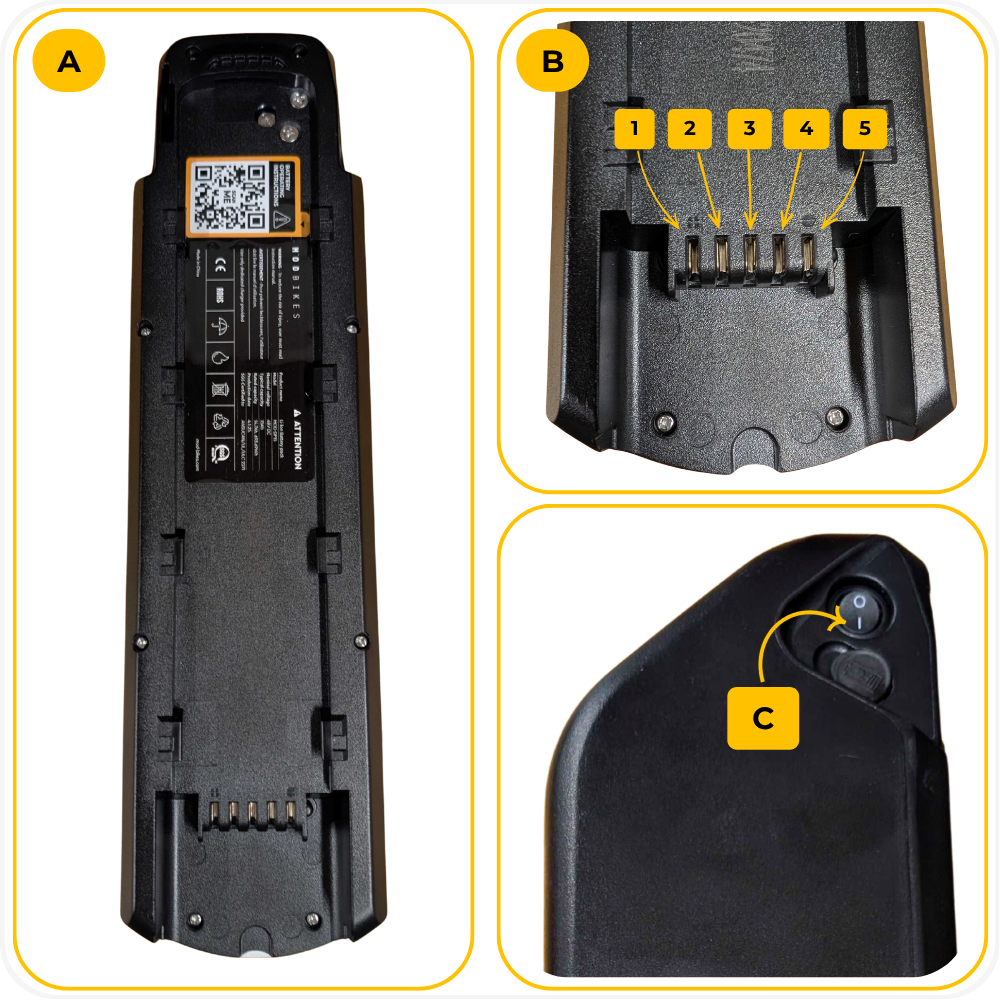
Step 1: Battery Orientation
Place the battery with the power button at the top and legs facing up.
Count the legs from left to right: 1, 2, 3, 4, 5.
Turn the battery ON.
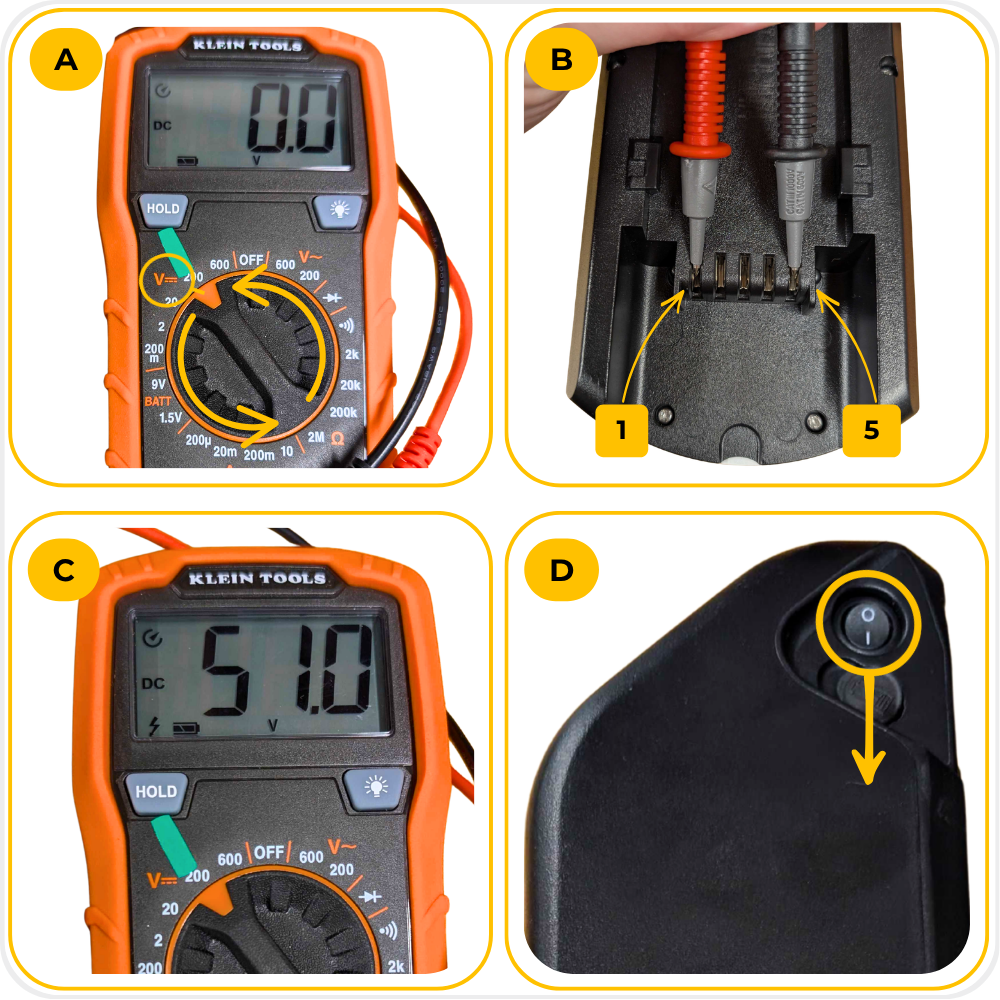
Step 2: Main Voltage Test
- Set the multimeter to DC voltage.
- Test voltage between legs 1 and 5.
- Normal voltage should read between 39V and 54V.
- If there is no voltage, confirm the battery is ON.
- If the battery is ON and still shows no voltage, charge the battery and repeat the test starting from Step 4.
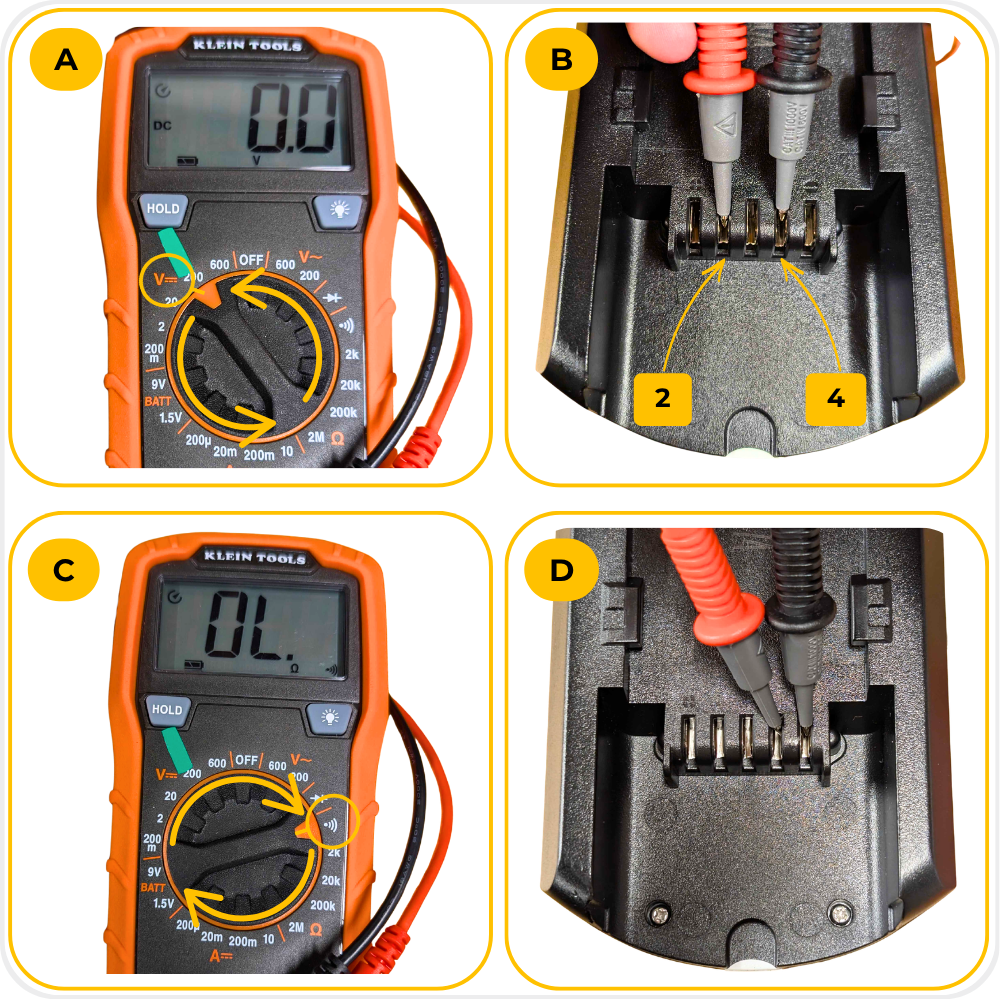
Step 3: S1 Battery Test
- Set the multimeter to DC voltage.
- Test voltage between legs 2 and 4. - If voltage is present between legs 2 and 4, continue to the next step.
- Set the multimeter to continuity mode ))).
- Test continuity between legs 4 and 5. - If there is continuity between legs 4 and 5, the battery is S1.
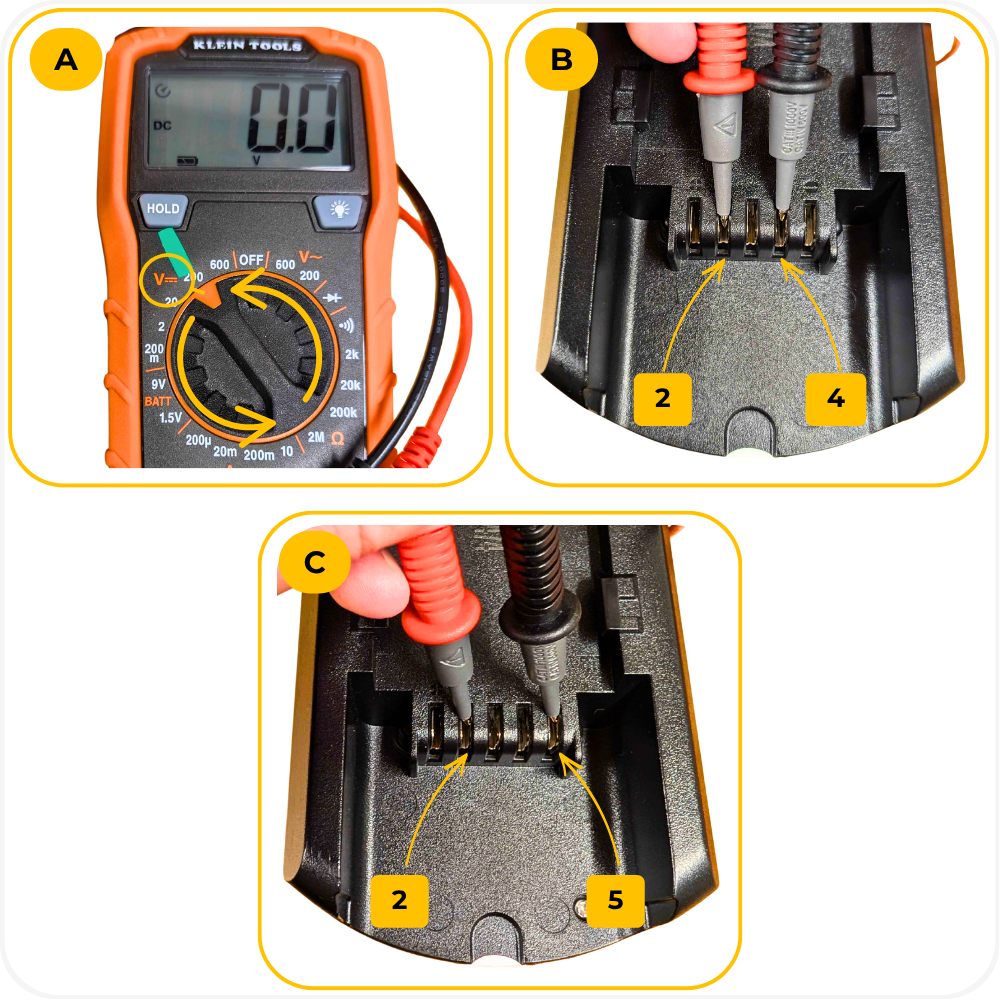
Step 4: S2 or S3 Battery Test
- Set the multimeter back to DC voltage.
- Test voltage between legs (2 + 4).
- Test voltage between legs (2 + 5). - If voltage is present between legs (2 + 5), the battery is S3. - If there is no voltage between legs (2 + 4) and no voltage between legs (2 + 5), the battery is S2.
Battery Housing Version Check
Step 1: Housing Orientation
- Place the housing with the cable at the bottom and legs facing up.
- Count the legs from left to right: 1, 2, 3, 4, 5.
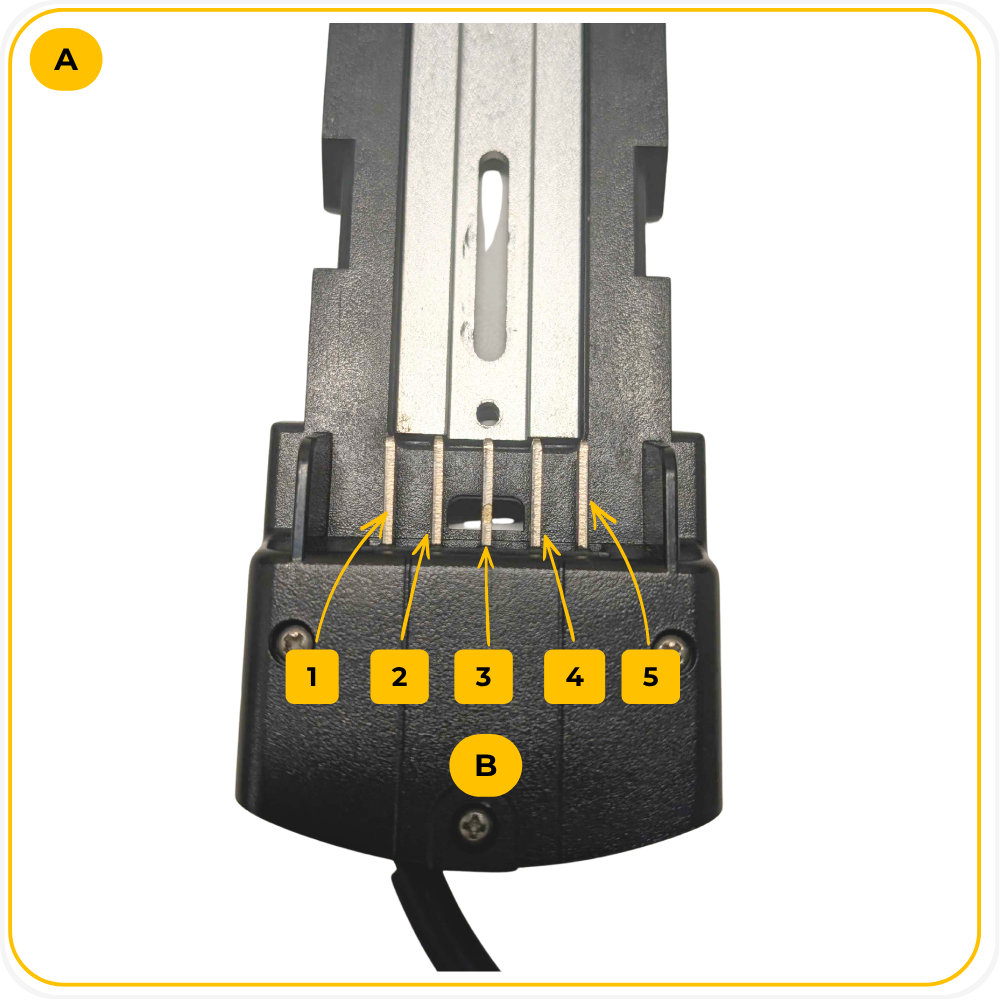
Step 2: S1 Housing Test
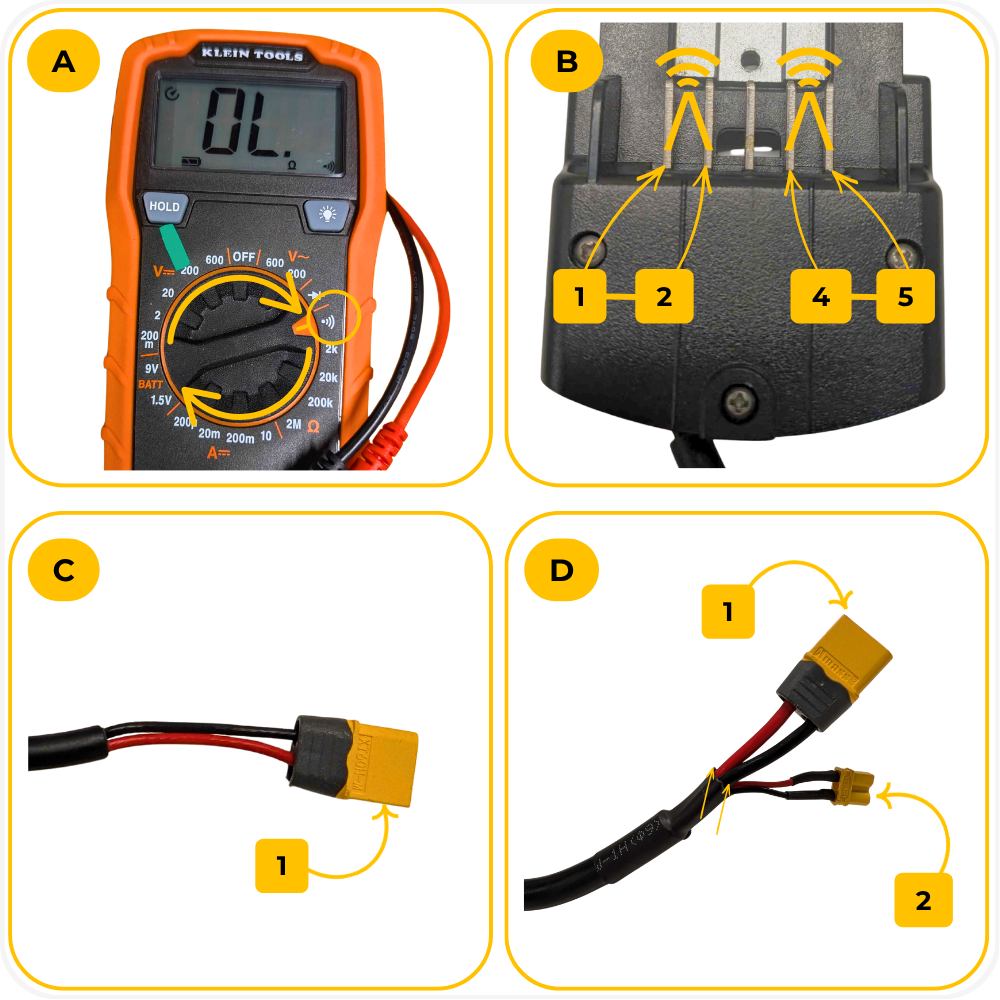
- Set the multimeter to continuity mode ))).
- Test continuity between legs (1 + 2); and legs (4 + 5).
- If there is a continuity tone, the housing is S1.
Step 3: S2 or S3 Housing Test
- If there is NO continuity, the housing is either S2 or S3.
- Inspect the housing connectors.
- If the housing has only one connector, the housing is S2.
- If the housing includes an additional charging connector, the housing is S3.
Polarity Reference
Battery Housing
- Legs 1 and 2 = Negative (-)
Legs 4 and 5 = Positive (+)
Battery
- Legs 1 and 2 = Positive (+)
Legs 4 and 5 = Negative (-)
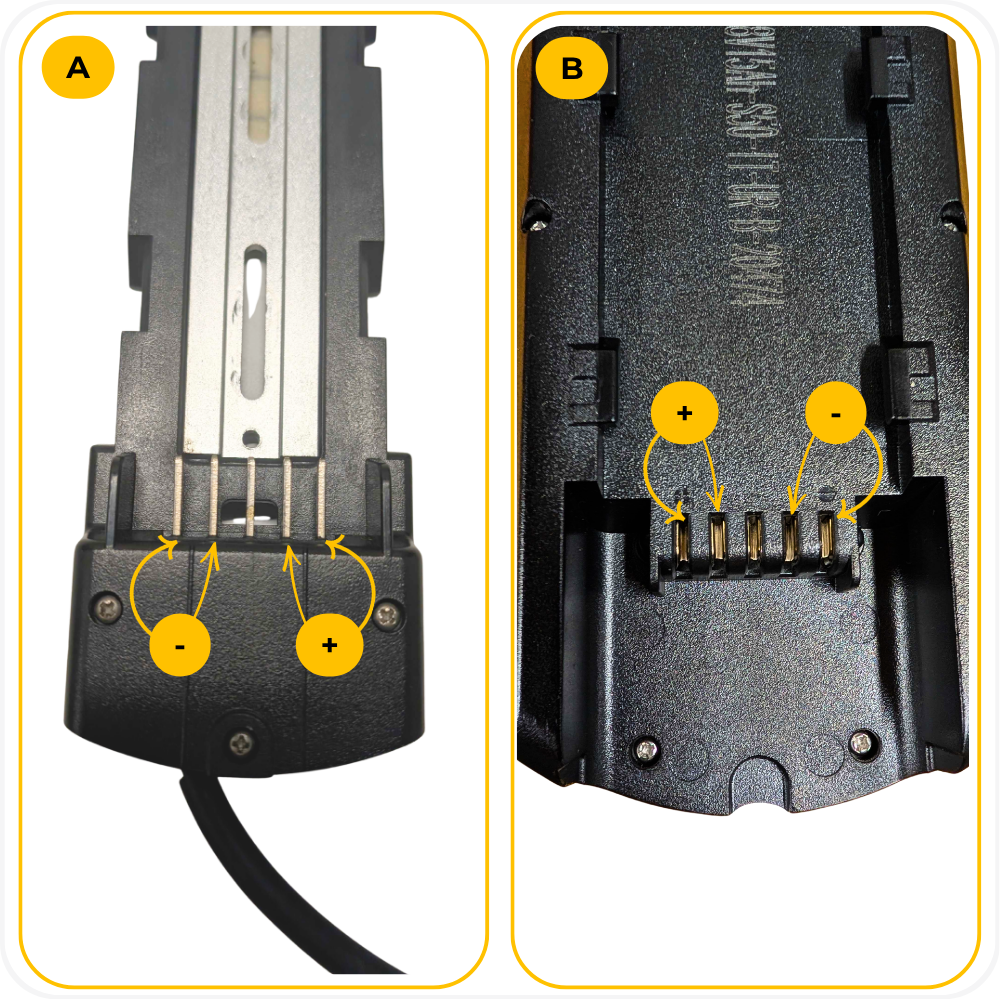
NOTE: The battery flips over when installed into the housing so that the polarity aligns correctly.
Troubleshooting
No continuity on the battery housing between legs 1 + 2 or legs 4 + 5 → Open the housing panel and confirm the wires are properly connected to the legs.
No voltage between battery legs 1 + 5 → Confirm the battery is turned ON and fully charged.
Voltage reading is unstable → Make sure the multimeter probes are making solid contact with the legs.
Voltage reading is outside 39V-50V → This may indicate a battery issue.
Unable to identify the version → Double-check the battery or housing orientation, confirm the leg numbering, and repeat the test.
FAQs
Why do I need to identify my battery and housing version?
Different battery and housing versions use different charging and discharge configurations. Using incompatible versions may cause charging problems, electrical issues, or possible damage to the battery system. Whenever upgrading or replacing a battery, especially if your MOD Bike is older, it is important to verify the version before making changes.What happens if my voltage reading is outside of the normal range?
The voltage can vary depending on the amount of charge it has, typically between 39V and 50V. A voltage reading outside the normal range may indicate a discharged battery, a damaged battery or an internal battery issue. Charge the battery fully and repeat the test before contacting supportWhy is there no continuity on my S1 housing?
If the housing does not show continuity between lets 1 + 2 and/or legs 4 + 5, open the housing panel, inspect the wiring connections to the legs and verify the wires are securely attached.
Warning
⚠️ Important Safety & Liability Notice

Always avoid touching multiple legs together with the multimeter probes during testing. Incorrect testing may cause sparks or damage to the battery system.

If you’re unsure or uncomfortable performing this diagnostic, please contact a qualified MOD BIKES technician or authorized service provider.

MOD BIKES is not liable for damage or injury caused by improper installation or failure to follow these instructions.
Was this article helpful?
That’s Great!
Thank you for your feedback
Sorry! We couldn't be helpful
Thank you for your feedback
Feedback sent
We appreciate your effort and will try to fix the article